Step-by-step guide

From Download to
Dominant Lineup
in Minutes

Matchup Master is built for league captains who want results fast. Here's exactly how to go from install to optimized lineup — no spreadsheets, no guesswork.
01
Install & OpenDownload Matchup Master from Google Play. Open the app — no account or login required. You're one tap away from your first roster.Works offline. No subscription. Android 8.0+.01
02
Build Your RosterAdd your players and enter their skill levels. Matchup Master supports both APA and BCA handicap formats — skill level capped at 23.Supports APA SL ratings and BCA handicap levels.02
03
Enter the Opponent LineupBefore match night, enter the opposing team's players and their skill levels. The app builds a full head-to-head matrix showing every possible matchup combination.Color-coded advantage indicators for every pairing.03
04
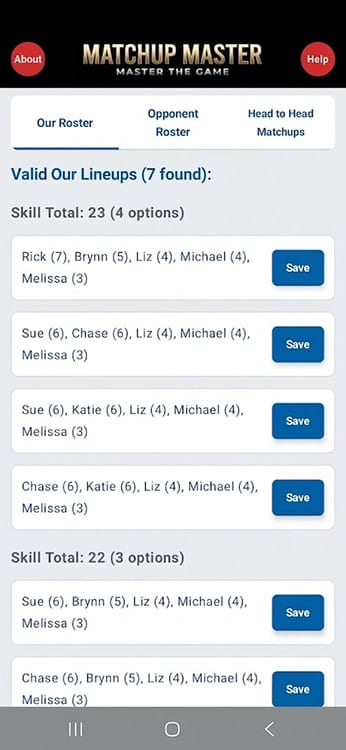
Get Your Optimal LineupMatchup Master calculates the skill-cap-compliant lineup that maximizes your team's statistical edge. Review the recommended order and walk in with confidence.Skill cap compliance verified automatically — every time.04
05
Adjust & RepeatSwap players, explore alternate lineups, and save rosters for future matches. The more you use it, the faster your pre-match prep becomes.Save multiple rosters across different teams and nights.05

Pro Tips for League Captains

Enter opponents early

Add the opposing team's roster the day before your match so you have time to study the matchup matrix without time pressure.

Use the head-to-head matrix

Don't just look at the recommended lineup — study the full matrix to understand which of your players have the strongest individual advantages.

Save multiple rosters

If you captain more than one team or play on multiple nights, save a separate roster for each so you're always ready. Up to 5 saved rosters available.

Ready to Run
Your Best Lineup?

Download Matchup Master on Android and walk into your next match with a data-driven edge.

Get it on Google Play

No account needed · Works offline